
Basic, Standard or Premium? We help you pick the right plan.
Microsoft 365 offers three Business editions that differ significantly in price and feature set. Book a free initial consultation — we'll analyse your requirements and recommend the right plan.
Microsoft 365 Business at a glance
Which plan fits which company? A quick orientation — the details are in the comparison table below.
Microsoft 365 Business Basic
Cloud-only entry-level
For small, young companies that work exclusively in the cloud and have no on-premises infrastructure. Exchange Online, OneDrive, SharePoint, Teams — but Office apps only in the web browser (no desktop install).
Microsoft 365 Business Standard
With desktop Office
For companies with on-premises infrastructure, low turnover, few programs and modest security requirements. Like Basic — plus desktop installation of Word, Excel, PowerPoint and Outlook.
Microsoft 365 Business Premium
Plus security & device management
For any company from 20 staff upward. Meets GDPR, ISO-27001 and TISAX requirements without third-party tools — includes Intune device management, Defender for Endpoint, Conditional Access and Entra ID P1.
Microsoft 365 Business Premium
- E-Mail-Hosting mit 50-GB-Postfach und E-Mail-Adressen mit eigener Domäne
- Microsoft Teams, der zentrale Ort für Teamarbeit
- Desktopversionen der Office-Anwendungen einschließlich Outlook, Word, Excel, PowerPoint und OneNote (plus Access und Publisher nur für PC)
- Office-Apps für das Web einschließlich Outlook, Word, Excel, PowerPoint und OneNote
- Online- und Videokonferenzen mit bis zu 300 Teilnehmenden
- Stets aktuelle Versionen von Word, Excel, PowerPoint und anderen Anwendungen
- Über Outlook, Exchange und Microsoft Teams mit Kunden und Kollegen in Kontakt bleiben
- Dateien mit 1 TB OneDrive-Cloudspeicher pro Nutzer von praktisch jedem Ort verwalten
- Wirksamer Phishing- und Ransomware-Schutz für Unternehmen zur Abwehr komplexer Cyberbedrohungen
- Kontrollierter Zugriff durch die Verschlüsselung vertraulicher Informationen, damit Daten nicht versehentlich offengelegt werden
- Geräte schützen, über die der Zugriff auf Daten erfolgt – mit Sicherheitslösungen und Updates für iOS, Android, Windows und MacOS
Das Abo Microsoft 365 Business Premium ist in drei Unterschiedlichen Laufzeiten verfügbar:
- 1 Monat Vertragslaufzeit für 24,70 Euro
- 1 Jahr Vertragslaufzeit monatliche Zahlung 20,60 Euro
- 1 Jahr Vertragslaufzeit jährliche Zahlung 247,20 Euro
Detaillierter Funktionsumfang der einzelnen Abonnements
| Basic | Standard | Premium | |
|---|---|---|---|
| Desktop client apps | ✓ | ✓ | |
| Office for mobile | ✓ | ✓ | ✓ |
| Install apps on up to 5 PCs/Mac + 5 tablets + 5 smartphones | ✓ | ✓ | ✓ |
| Office for the web | ✓ | ✓ | ✓ |
| Visio for the web | ✓ | ✓ | ✓ |
| Microsoft Editor premium features | ✓ | ✓ | |
| Multilingual user interface for Office applications | ✓ | ✓ | |
| Exchange Plan 1 (50 GB mailbox) | ✓ | ✓ | ✓ |
| Exchange Plan 2 (100 GB mailbox) | |||
| Calendar | ✓ | ✓ | ✓ |
| Outlook desktop client | ✓ | ✓ | |
| Auto-expanding email archive | ✓ | ||
| Exchange Online Protection | ✓ | ✓ | ✓ |
| Public folder mailboxes | ✓ | ✓ | ✓ |
| Resource mailboxes | ✓ | ✓ | ✓ |
| Microsoft Shifts | ✓ | ✓ | ✓ |
| Microsoft Bookings | ✓ | ✓ | ✓ |
| Microsoft Teams | ✓ | ✓ | ✓ |
| Unlimited chat | ✓ | ✓ | ✓ |
| Online meetings | ✓ | ✓ | ✓ |
| Webinars | ✓ | ✓ | |
| Screen sharing and custom backgrounds | ✓ | ✓ | ✓ |
| Record meetings | ✓ | ✓ | ✓ |
| Priority notifications | ✓ | ✓ | ✓ |
| SharePoint Plan 1 (10 GB storage13, 1 TB OneDrive storage) | ✓ | ✓ | ✓ |
| Microsoft Graph API | ✓ | ✓ | ✓ |
| Microsoft Search | ✓ | ✓ | ✓ |
| Microsoft Stream (on SharePoint) | ✓ | ✓ | ✓ |
| Microsoft Forms16 | ✓ | ✓ | ✓ |
| Microsoft Lists | ✓ | ✓ | ✓ |
| Delve | ✓ | ✓ | ✓ |
| Create document understanding or form processing models17 | ✓ | ✓ | ✓ |
| Access content centers17 | ✓ | ✓ | ✓ |
| View metadata extracted by document understanding or form processing models17 | ✓ | ✓ | ✓ |
| Productivity Score | ✓ | ✓ | ✓ |
| Secure Score | ✓ | ✓ | ✓ |
| Compliance Management | ✓ | ✓ | ✓ |
| Power BI Pro | |||
| Microsoft Planner | ✓ | ✓ | ✓ |
| Microsoft To-Do | ✓ | ✓ | ✓ |
| Personal insights in Teams | ✓ | ✓ | ✓ |
| Power Apps for Microsoft 365 | ✓ | ✓ | ✓ |
| Power Automate for Microsoft 365 | ✓ | ✓ | ✓ |
| Power Virtual Agent for Teams | ✓ | ✓ | ✓ |
| Dataverse for Teams | ✓ | ✓ | ✓ |
| Microsoft Intune | ✓ | ||
| Mobile Device Management | ✓ | ||
| Mobile application management | ✓ | ||
| Windows AutoPilot | ✓ | ||
| Group Policy support | ✓ | ✓ | |
| Office cloud policy support | ✓ | ✓ | ✓ |
| Shared computer activation for Microsoft 365 Apps | ✓ | ||
| Endpoint Analytics | ✓ | ||
| Cortana management | ✓ | ||
| Microsoft Defender Exploit Guard | ✓ | ||
| Microsoft Defender Credential Guard | ✓ | ||
| BitLocker and BitLocker To Go | ✓ | ||
| Windows Information Protection | ✓ | ||
| Microsoft Defender for Business | ✓ | ||
| Azure Active Directory Premium Plan 1 | ✓ | ||
| User Provisioning | ✓ | ||
| Self Service Password Reset | ✓ | ||
| Multi Factor Authentication | ✓ | ✓ | ✓ |
| Conditional Access | ✓ | ||
| On-premises Active Directory sync for SSO | ✓ | ||
| Windows Hello for Business | ✓ | ||
| Microsoft Defender for Cloud Apps Discovery | ✓ | ||
| Manual retention labels | ✓ | ||
| Basic org-wide or location-wide retention policies | ✓ | ||
| Azure Information Protection Plan 1 | ✓ | ||
| Manual, default, and mandatory sensitivity labeling in Office 365 | ✓ | ||
| Manual labeling with the AIP app and plugin | |||
| Data Loss Prevention (DLP) for emails and files | ✓ | ||
| Basic Message Encryption | ✓ | ||
| Content Search | ✓ | ✓ | ✓ |
| eDiscovery (Standard) (including Hold and Export) | ✓ | ||
| Litigation Hold | ✓ | ||
| Audit (Standard) | ✓ | ✓ | ✓ |
| Windows 11 Edition | Business | ||
| Azure Virtual Desktop | ✓ | ||
| Universal Print | ✓ |
Detailed comparison of Microsoft 365 Business Basic vs Microsoft 365 Standard vs Microsoft 365 Premium plans and recommendation for businesses.
By the way, we are an IT service provider, consulting, licensing, setup and support are a breeze for us. Talk to us about it today.

Microsoft 365 Business Basic vs Business Standard vs Business Premium.
How do the 3 editions differ from each other - All editions cost different amounts, but aside from the price, the feature set is very different.
There is no universal recommendation, but it is important to understand what features each subscription offers and how the different subscriptions build on each other. Microsoft 365 Business Basic offers the smallest feature set, followed by Business Standard and last but not least Microsoft 365 Business Premium with the largest feature set.
The different subscriptions build on each other, i.e. all functions of the smaller subscription are included. Business Standard includes all the features of Business Basic, plus the ability to install Office programs on the computer. More about this later.
Microsoft 365 Business Basic
Let's start as with Business Basic. As already mentioned, M365 Business Basic is the smallest of the 3 subscriptions. But that doesn't mean you have to exclude it right away. Users who are assigned a Business Basic license get one:
- A personal email mailbox(Exchange Online)
- 1 TB of personal OneDrive storage,
- 1 TB of shared SharePoint storage
- Microsoft Teams
- the ability to access Office applications on the web.
Exchange will be a familiar name to many larger companies, for those unfamiliar with Exchange, here's a quick summary - Exchange is an email server service, users get a 50GB mailbox that has a calendar and contact book. Access to the emails, contacts and calendars is possible through various sources such as Outlook on the computer, the smartphone or even outlook.com. Thanks to the Exchange service, the data is always up to date on all devices, i.e. an appointment is available on both the computer and the smartphone, an email read on the smartphone is also marked as read on the computer. Users can share what information other colleagues see, e.g. calendars or even emails can be shared, e.g. when on vacation or sick.
OneDrive is the personal cloud storage of a user. Each user gets 1TB of cloud storage, which is designed to allow users to access their data from different devices.
Sharepoint is similar to Onedrive and yet something completely different, it is a company intranet where all employees can find the information, news, documents, processes, forms and files relevant to them. A total of 1 TB of storage is available to the company. The intranet can be very well customized and optimized to the company.
Teams, everyone has heard of Corona, is a place where colleagues can collaborate on files and documents in a decentralized manner. Teams can be used to organize meetings with internal and external people. Users can chat, "phone" or video call with other users individually, in groups or in teams for specific processes, projects, etc.
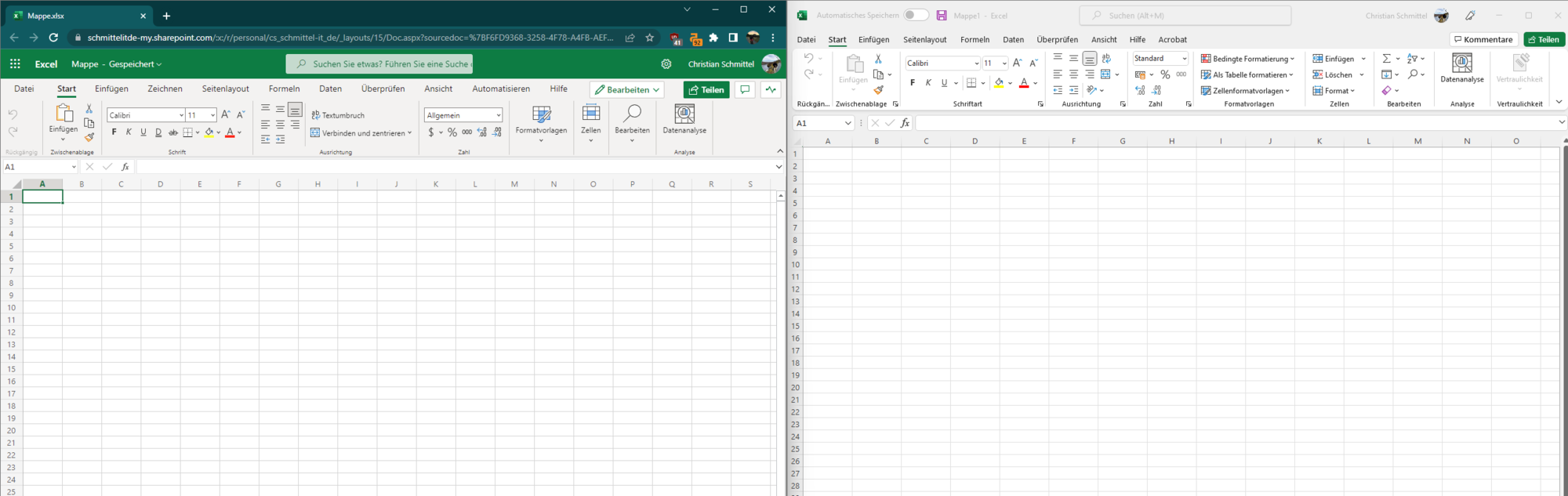
The well-known office applications such as Word, Excel, PowerPoint and Outlook are probably familiar to everyone. However, the Business Basic subscription does not include the desktop applications, i.e. you cannot install the programs on your computer. The editing of Word, Excel and PowerPoint files is still possible. The users who are assigned a Business Basic license get the possibility to use Office on the web. This means that office.com can be called up on any browser, where the familiar applications can be found.
When calling up the website, the program looks very similar to the classic application at first glance. However, web applications reach their limits when it comes to large files.
If you are not sure whether this is the right license, you can book a free trial month with us.
The cost of the license is 67.2 euros plus VAT for an annual subscription.
<img src="TODO-asset:/fileadmin/_processed_/7/a/csm_excel-Web-vs-Desktop_6069b17df5.png" alt="">
Microsoft 365 Business Standard
Wie bereits erwähnt, bauen die Abonnements aufeinander auf. So beinhaltet Microsoft 365 Business Standard alle Funktionen von Business Basic und zusätzlich die Office-Anwendungen in der Desktop-Version. Im Unterschied zu Business Basic erhält ein Benutzer mit einer zugeordneten Business Standard Lizenz die klassischen Office-Anwendungen Word, Excel, PowerPoint, Outlook und Access für den Computer. Ein Benutzer kann die Office-Anwendung auf 15 Geräten installieren (5 Computer, 5 Smartphones und 5 Tablets).
Business Standard ist somit die beste Wahl für Unternehmen, die die Vorteile der Cloud mit den Vorteilen von Desktop-Anwendungen kombinieren möchten. Die Vorteile des Abonnementmodells im Vergleich zum einmaligen Kauf der Software
- Immer die neueste Software
- Geringe Investitionskosten
- Kein Software-Chaos im Unternehmen, z.B. Word 2010 auf Rechner A und Word 2021 auf Rechner B
- Einfache Lizenzierung über CSP
- Günstiger, wenn ein Anwender mehrere Geräte nutzt
- Lizenzen können einfach erweitert bzw. reduziert werden
Microsoft 365 Busiess Standard Funktionen und Kosten auf einen Blick.
Enthält folgende Dienste:


Microsoft 365 Business Premium
Kommen wir nun zum letzten und umfassendsten Abo der Microsoft 365 Business Pläne: Business Premium. Wie bei den kleineren Tarifen Basic und Standard sind auch hier alle Kernfunktionen enthalten. Doch Business Premium geht weit darüber hinaus und ist heute die beste Wahl für Unternehmen, die IT-Sicherheit ernst nehmen und eine moderne Endgeräteverwaltung umsetzen wollen.
Viele Unternehmen zögern noch, aber früher oder später führt kein Weg mehr an Business Premium vorbei. Ab 20 Mitarbeitern ist es bereits stark zu empfehlen, da IT-Prozesse vereinfacht und Sicherheitsrisiken reduziert werden. Ab 50 Mitarbeitern ist es nahezu alternativlos, weil nur damit eine effiziente und skalierbare IT-Umgebung geschaffen werden kann.
Doch es geht nicht nur um Bequemlichkeit. IT-Sicherheit ist heute ein entscheidender Faktor für den Unternehmenserfolg. Ohne die richtigen Maßnahmen sind sensible Daten, Kundenkommunikation und Unternehmensressourcen ständig potenziellen Bedrohungen ausgesetzt.
Die wichtigsten Vorteile von Microsoft 365 Business Premium
Microsoft 365 Business Premium kombiniert Produktivität mit Sicherheit – genau das, was moderne Unternehmen brauchen. Die wichtigsten Funktionen:
- Intune → Zentrale Verwaltung für Windows-, Mac-, iOS- und Android-Geräte. Softwareverteilung, Updates, Sicherheitsrichtlinien – alles aus einer Hand. Das spart wertvolle IT-Ressourcen und automatisiert viele Prozesse.
- Defender for Business → Einheitlicher Malware-Schutz für alle Geräte. Alle Sicherheitsereignisse im Blick, proaktiver Schutz vor Bedrohungen und Angriffe frühzeitig erkennen.
- Defender for Office 365 → Schützt die Unternehmenskommunikation vor Phishing, Spam und gefährlichen Anhängen. Verdächtige E-Mails werden automatisch geprüft, unsichere Links blockiert, und riskante Inhalte in Quarantäne verschoben.
- Entra ID P1 → Erweiterte Identitätsverwaltung mit dynamischen Gruppen und Conditional Access, um den Zugriff auf Unternehmensressourcen gezielt zu steuern. So wird sichergestellt, dass nur die richtigen Personen zur richtigen Zeit Zugriff auf sensible Daten haben.
Neben den erweiterten Sicherheitsfunktionen bringt Business Premium auch wichtige Änderungen in der Lizenzierung mit sich – insbesondere für Unternehmen, die Office-Anwendungen in einer Terminalserver- oder VDI-Umgebung betreiben.
IT-Sicherheit: Ein unterschätztes Risiko
Viele Unternehmen wägen sich in falscher Sicherheit, weil sie glauben, dass ihre Daten nicht wertvoll genug für Angreifer sind. Doch Angriffe erfolgen oft nicht gezielt – sondern automatisiert. Das beste Beispiel:
Ein lokales Unternehmen aus dem Harz, eine kleine Marketing-Agentur (weniger als 20 Mitarbeiter), verzichtete auf Multi-Faktor-Authentifizierung (MFA) mit der Begründung: "Alle Daten, mit denen wir arbeiten, werden am Ende sowieso veröffentlicht – warum sollten wir sie schützen?"
Dann passierte es: Ein einziger Klick auf eine Phishing-Mail reichte aus – ein Mitarbeiter gab seine Zugangsdaten ein, und plötzlich hatte ein Angreifer vollen Zugriff auf das gesamte E-Mail-Konto. Über seinen Account wurden 2.500 betrügerische E-Mails mit weiteren Phishing-Links an alle Kunden versendet – darunter auch große Unternehmen.
Das Ergebnis?
- Vertrauensverlust bei vielen Kunden
- Rechtsstreit mit dem größten Auftraggeber
- Monatelanger Schaden für die Reputation des Unternehmens
Hätte die Agentur Business Premium mit Defender for Office 365, Conditional Access und MFA genutzt, wäre dieser Vorfall gar nicht erst möglich gewesen.
Fazit: Business Premium ist keine Frage des "Ob", sondern des "Wann"
Die Anforderungen an IT-Sicherheit und Verwaltung steigen stetig. Unternehmen, die heute nicht handeln, werden früher oder später mit den Folgen konfrontiert – sei es durch Cyberangriffe, ineffiziente IT-Prozesse oder hohe Verwaltungskosten.
Mit Microsoft 365 Business Premium lassen sich Sicherheitsmaßnahmen einfach umsetzen, Compliance-Vorgaben erfüllen und wertvolle IT-Ressourcen sparen. Wer auf eine zukunftssichere IT setzen möchte, kommt daran nicht mehr vorbei.
Alle Eigenschaften auf einen Blick zusammengefasst:
- Alle Funktionen aus Business Basic und Business Standard
- Erweite Nutzungsrechte | darf auf Terminalserver installiert werden
- Microsoft Intune
- Azure Information Protection
- Defender for Office 365
- Defender for Business
- Jahrespreis 247,20 Euro
Auf einen Blick: Funktionen und Kosten von Microsoft 365 Business Premium
Enthält folgende Dienste:

Sie sind nicht sicher, welches Abonnement für Ihr Unternehmen am besten geeignet ist?
Rufen Sie uns noch heute an oder schicken Sie uns eine E-Mail. Wir beraten Sie umfassend zu den Lizenzierungsmöglichkeiten und klären technische Fragen im Vorfeld mit Ihnen oder Ihrem IT-Verantwortlichen.
Alle Informationen auf einen Blick zusammengefasst. Weiter auf der Seite finden Sie einen detaillierten Vergleich der Produkte.
Microsoft 365 Business Basic
- E-Mail-Hosting mit 50-GB-Postfach und E-Mail-Adressen mit eigener Domäne
- Microsoft Teams, der zentrale Ort für Teamarbeit
- Office-Apps für das Web einschließlich Outlook, Word, Excel, PowerPoint und OneNote
- 1 TB OneDrive-Cloudspeicher pro Nutzer zum Speichern und Teilen von Dateien
- Online- und Videokonferenzen mit bis zu 300 Teilnehmenden
Das Abo Microsoft 365 Business Basic ist in drei Unterschiedlichen Laufzeiten verfügbar:
- 1 Monat Vertragslaufzeit für 6,72 Euro
- 1 Jahr Vertragslaufzeit monatliche Zahlung 5,60 Euro
- 1 Jahr Vertragslaufzeit jährliche Zahlung 67,20 Euro
Microsoft 365 Business Standard
- Desktopversionen der Office-Anwendungen einschließlich Outlook, Word, Excel, PowerPoint und OneNote (plus Access und Publisher nur für PC)
- E-Mail-Hosting mit 50-GB-Postfach und E-Mail-Adressen mit eigener Domäne
- Microsoft Teams, der zentrale Ort für Teamarbeit
- 1 TB OneDrive-Cloudspeicher pro Nutzer zum Speichern und Teilen von Dateien
- Eine Lizenz umfasst die vollständig installierten Office-Anwendungen auf bis zu 15 Endgeräten (5 Smartphones, 5 Tablets sowie 5 PCs oder Macs) pro Nutzer
Das Abo Microsoft 365 Business Standard ist in drei Unterschiedlichen Laufzeiten verfügbar:
- 1 Monat Vertragslaufzeit für 14,40 Euro
- 1 Jahr Vertragslaufzeit monatliche Zahlung 11,70 Euro
- 1 Jahr Vertragslaufzeit jährliche Zahlung 140,40 Euro
Namensänderung bei den Abonnements
2020 hat Microsoft die Business Pläne umbenannt.
Aus Office 365 Business Esseintals wurde Microsoft 365 Business Basic, Office 365 Business Premium wurde zu Microsoft 365 Business Standard, Microsoft 365 Business wurde zu Microsoft 365 Business Premium.
Vom Leistungsumfang hat sich nichts geändert